Since we depend on using the internet to look up references, many have foreseen a future where we carry around Wikipedia, etc. on small flash or hard drive and take it with us when we don't have internet access (or if it's expensive).
In fact, one physicist has already downloaded the contents of hep-th from the arXiV and made it available as an 8 GB file.
16 May 2006


Life hack: Organizing .pdfs of publications
My sister and I have been having a discussion about the best way to organize your electronic files, in particular .pdfs of publications.
I suggested using long filenames (which I learned from my master's thesis advisor). For example, the famous superconductivity article
J. Bardeen, L.N. Cooper, and J.R. Schrieffer, "Theory of Superconductivity," Phys. Rev. 108, 1175-1204 (1957)
could be saved as
SC-bardeen-cooper-schrieffer-theory-of-superconductivity-pr-v108-p1175-1975.pdf
"SC" is a category label for superconductivity. Then you could use UNIX commands like grep to search for the words in the filename.
My sister didn't like that idea, so she asked around and her friend suggested using JabRef. I haven't tried it out, but apparently it's a Java based (thus platform independent) program that can understand LaTeX's BibTeX format. The screenshots look pretty good. You can search by author, title, etc. and see the abstracts in a subpanel below the listings of your collected publications.
If you're paranoid like me and worry about depending on any software more advanced than emacs, you could implement both systems!
I suggested using long filenames (which I learned from my master's thesis advisor). For example, the famous superconductivity article
J. Bardeen, L.N. Cooper, and J.R. Schrieffer, "Theory of Superconductivity," Phys. Rev. 108, 1175-1204 (1957)
could be saved as
SC-bardeen-cooper-schrieffer-theory-of-superconductivity-pr-v108-p1175-1975.pdf
"SC" is a category label for superconductivity. Then you could use UNIX commands like grep to search for the words in the filename.
My sister didn't like that idea, so she asked around and her friend suggested using JabRef. I haven't tried it out, but apparently it's a Java based (thus platform independent) program that can understand LaTeX's BibTeX format. The screenshots look pretty good. You can search by author, title, etc. and see the abstracts in a subpanel below the listings of your collected publications.
If you're paranoid like me and worry about depending on any software more advanced than emacs, you could implement both systems!
11 May 2006
Hockey: What I learned from watching the Stanley Cup playoffs
Unfortunately, the Sharks lost to the Edmonton Oilers in triple overtime last night. At least, I learned a lot. I've decided to record some of the (rudimentary) concepts I've observed while watching the playoffs.
Offense: Strong forechecks can be a good way to keep pressure up. Dump the puck into the attacking zone and tie up the defenseman who is getting the puck -- hopefully your offensive partner will pick up the loose puck. Change up the tempo of the game by taking your time behind the net. Follow up all your shots on net. Try a drop pass.
Defense: If you are under pressure from a forecheck yourself, find the open person and break out. When defending against an offensive rush, plug up the middle and force the offense to go up the boards. Box out the forwards and prevent them from screening your goalie.
Goal: Strong positioning is a major aspect of good goaltending.
Psychology: Don't have a bad first period. If the first period is going badly, hang in there and come back for a better second period.
Offense: Strong forechecks can be a good way to keep pressure up. Dump the puck into the attacking zone and tie up the defenseman who is getting the puck -- hopefully your offensive partner will pick up the loose puck. Change up the tempo of the game by taking your time behind the net. Follow up all your shots on net. Try a drop pass.
Defense: If you are under pressure from a forecheck yourself, find the open person and break out. When defending against an offensive rush, plug up the middle and force the offense to go up the boards. Box out the forwards and prevent them from screening your goalie.
Goal: Strong positioning is a major aspect of good goaltending.
Psychology: Don't have a bad first period. If the first period is going badly, hang in there and come back for a better second period.
Linux migration links
While on a break from work, I found some really good articles about how to make the switch to Linux: "Boot out Microsoft, boot up linux" and "Everything you wanted to know about Linux." I also found out about CrossOver Office, an application that allows you to run some Windows software directly in Linux. Finally, an interesting article about a Linux alternative: BSD.
09 May 2006
The most amazing hockey play ever
Maybe I'm a bit biased since I'm a San Jose Sharks fan, but you have to check out this video clip of last night's playoff game (Sharks vs. Edmonton Oilers)
At the beginning of the clip, the Sharks are on the penalty kill with a 2 man disadvantage (5 on 3). The Oilers play keepaway, two Sharks defenders break their sticks, and finally a Shark throws himself on the ice, knocking the puck out of the zone with his glove. When I watched this scene on TV last night, I could not believe my eyes.
At the beginning of the clip, the Sharks are on the penalty kill with a 2 man disadvantage (5 on 3). The Oilers play keepaway, two Sharks defenders break their sticks, and finally a Shark throws himself on the ice, knocking the puck out of the zone with his glove. When I watched this scene on TV last night, I could not believe my eyes.
Tech: Motion LE 1600 Tablet PC
Being the organizational freak that I am, it would be wonderful to take notes pen-and-paper style (simple, robust) and be able to refer to those notes electronically (the power of search!) Ideally, you would have software that reads your handwriting and converts it to electronic format (even mathematical symbols). I guess an alternative is to LaTeX your notes at the speed of light, but I don't have enough talent and attention to do that.
One neat tool out there is the Tablet PC. I like the idea of a slate tablet (as opposed to a so-called "convertible" tablet that tries to be both an ultraportable laptop and a tablet). It would be nice to try the Motion LE 1600. If only it wasn't $2000.
One neat tool out there is the Tablet PC. I like the idea of a slate tablet (as opposed to a so-called "convertible" tablet that tries to be both an ultraportable laptop and a tablet). It would be nice to try the Motion LE 1600. If only it wasn't $2000.
Make your office reflect who you want to be
It was a pleasant surprise to spot these links from a Lifehacker post today: Set up your workspace and Creating a productive workspace. All good advice about how to think about creating an ideal work environment.
A few weeks ago, I also did a small office makeover. I decided I wanted to be more serious so I removed the cartoon poster from my wall. I cleared everything off my desk except what I was using for my current project. A few months ago, I also added a few plants. It's nice to have something to take care of (besides spyware on computers).
I also like the idea of working in different positions. I've tried sitting on top of my desk and propping my back against the wall with a cushion. I also put my book on a book holder and put the holder on top of a file cabinet so I can read standing up. Sometimes it's just good to do something slightly different; it feels refreshing.
A few weeks ago, I also did a small office makeover. I decided I wanted to be more serious so I removed the cartoon poster from my wall. I cleared everything off my desk except what I was using for my current project. A few months ago, I also added a few plants. It's nice to have something to take care of (besides spyware on computers).
I also like the idea of working in different positions. I've tried sitting on top of my desk and propping my back against the wall with a cushion. I also put my book on a book holder and put the holder on top of a file cabinet so I can read standing up. Sometimes it's just good to do something slightly different; it feels refreshing.
Link of the day: PBS Nerd TV
Via Lifehacker: Nerd TV. It's a show where they interview nerds, in particular famous people from the computer/electronic industry.
08 May 2006
Bedside capture device
I use a spiral top notebook with a mini-Sharpie and a keychain white LED tied to the spiral.
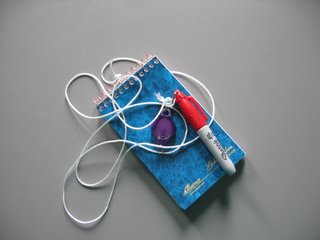
Another possibility is a voice recorder.

Another possibility is a voice recorder.
07 May 2006
Practice makes perfect
If you weren't convinced that hard work pays off, check out this New York Times magazine article.
Subscribe to:
Posts (Atom)